

 spyus.link
XSS Exploitation Tool 2026
XSS Exploitation Tool 2026
Sharpforce's XSS Exploitation Tool 2026, hosted on GitHub, is a powerful penetration testing utility designed to explore and demonstrate Cross-Site Scripting (XSS) vulnerabilities. This open-source tool is designed for security researchers and ethical hackers seeking to understand and mitigate XSS risks in web applications. In this article, we'll dive into the tool's features, installation process, usage, and its significance in the cybersecurity landscape, with a focus on ethical and permissible use.
What is Cross-Site Scripting (XSS)?
Cross-Site Scripting (XSS) is a prevalent web security vulnerability that allows attackers to inject malicious scripts into web pages viewed by users. These scripts can steal sensitive data, such as cookies, session tokens, or input field data, and even redirect users to malicious sites. The XSS Exploitation Tool provides a controlled environment for testing and analyzing these vulnerabilities, helping developers secure their applications.
Key Features of the XSS Exploitation Tool 2026
The XSS Exploitation Tool 2026 offers a robust set of features to effectively simulate and analyze XSS vulnerabilities:
Browser Technical Data: Collects detailed information about the victim's browser, such as the user agent and platform. Geolocation Tracking: Identifies the geographical location of the compromised user. Page Preview: Captures a visual snapshot of the compromised page. Source Code Extraction: Retrieves the source code of the compromised page for analysis. Input Field Data Exfiltration: Extracts data entered into form fields. Cookie Theft: Captures cookies, which may include session tokens. Keylogging: Logs keystrokes to demonstrate potential data leaks. Alert Box Display: Triggers alert boxes to simulate user interaction. User Redirection: Redirects users to specified URLs for testing purposes.
These features make the tool a comprehensive solution for understanding the impact of XSS vulnerabilities in a controlled and ethical testing environment.
Installation using Docker
Docker provides a simplified way to configure the tool and its dependencies. Follow these steps: Build the Docker image: docker-compose -f docker-compose.yml up -d This command starts the server and database in the background. Access the interface: Open your browser and go to
You must be registered for see links
to access the XSS exploitation tool interface.Installing on a Host System (Debian 12)
For those who prefer a direct installation, the tool has been tested on Debian 12. Here's how to configure it:
Install Git: sudo apt-get install git Clone the repository: cd /tmp git clone
You must be registered for see links
Run the installation script: cd ./XSS-Exploitation-Tool/bin/ sudo chmod +x ./install.sh sudo ./install.sh Access the interface: Visit
You must be registered for see links
to see the tool's interface.How the XSS Exploitation Tool 2026 Works
The tool works by injecting a JavaScript hook into a vulnerable web page. Here's a breakdown of its workflow:
Access the demo page: Go to
You must be registered for see links
to explore the tool's capabilities in a controlled environment. Inject the JavaScript hook: To test for a real XSS vulnerability, insert the following script into a parameter ( vulnerable:?vulnerable_param=< script src="
You must be registered for see links
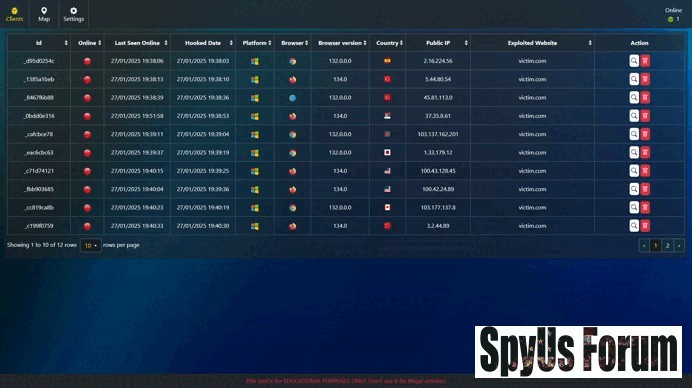
"/> Monitor Hooked Browsers: When victims visit the hooked page, the tool's server records their browser details and interactions, providing real-time information about the exploit.This process allows security professionals to simulate XSS attacks and assess potential damage in a safe and authorized setting.
Ethical Use and Disclaimer
The XSS exploitation tool is intended for educational and authorized penetration testing purposes only. Unauthorized use of this tool on systems you do not own or do not have explicit permission to test is illegal and unethical. The Sharpforce developers emphasize that they are not responsible for any misuse of the tool. Always obtain appropriate authorization before performing security tests.
[/center]
[/CENTER]


